
Introduction
If you are completely new to Battery 4 you might want to review the Battery 4 User Manual to get a broader idea of its features and to reinforce what is described below, but this article along with basic Battery and Mandala V3 knowledge should hopefully be enough to put you on your way setting up any single or combined number of Mandala pads as triggers for Native Instruments Battery 4 audio software.
Pad and Pedal Layout
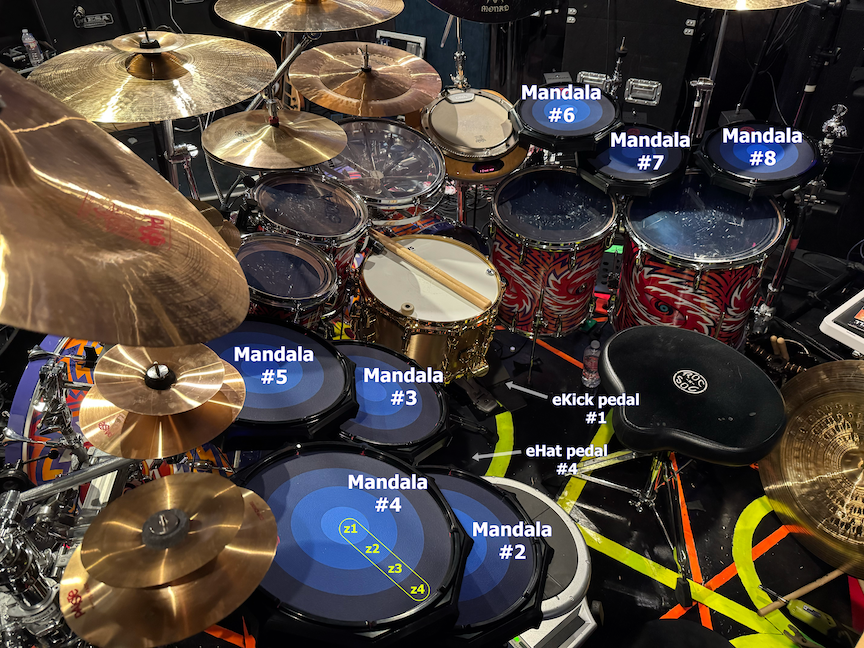
Danny’s Kit with Labeled Mandala Pads
Let’s start by taking a look above at the layout of Danny’s seven Mandala pads, #2 through #8, and his two electronic pedals, #1 Fat KAT and #4 Hat KAT. The numbers are labels for each device and they represent which MIDI channel each device is transmitting MIDI data on. The pads are connected across standard USB cables to a powered USB hub. The pedals are connected to proprietary Mandala pedal converter circuitry with 1/4” cables. The USB hub and pedal converter are then connected over USB to a MacBook running Native Instruments Battery 4 sample trigger software.
V3 MIDI Output Configuration
DC’s Standard Pad Configuration
and DC’s Pad #4 Configuration (used as hat)
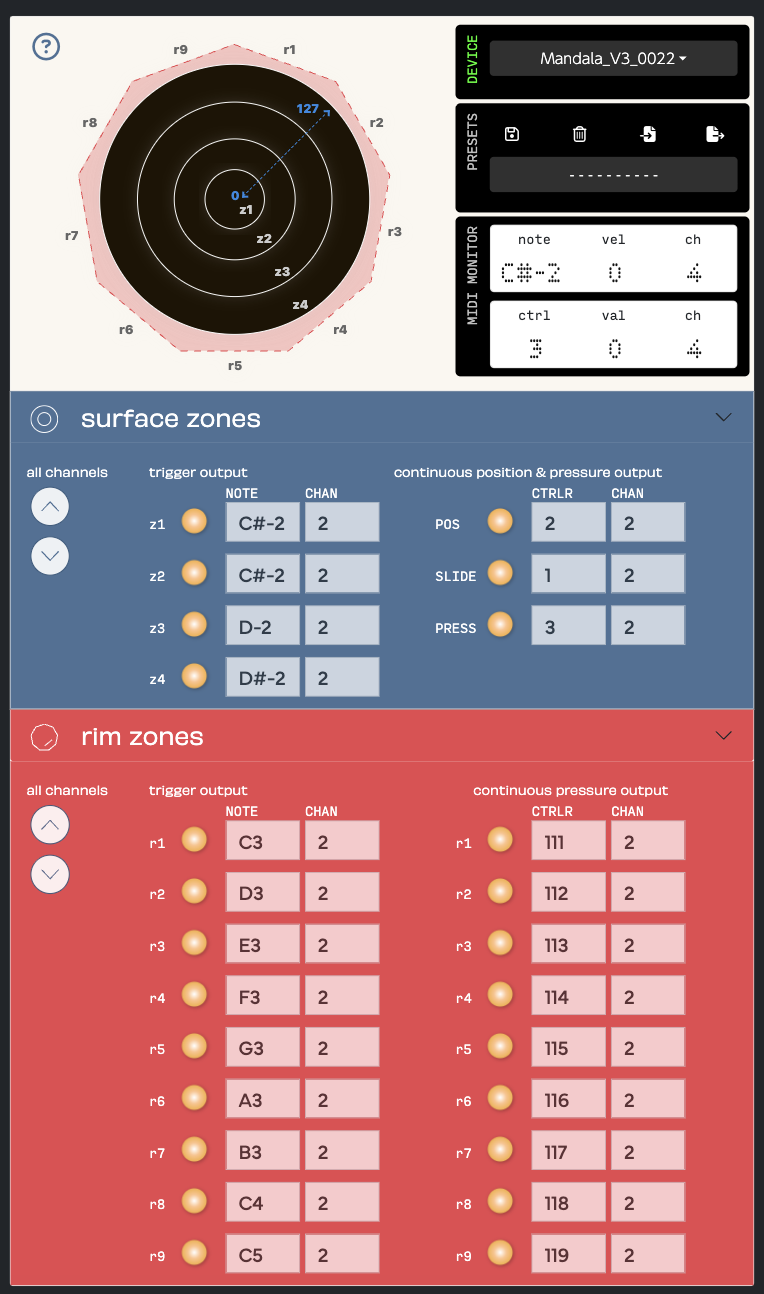
V3 Setup for Mandala #2 (used as a standard pad just like Mandala #3, #5, #6, #7, and #8)
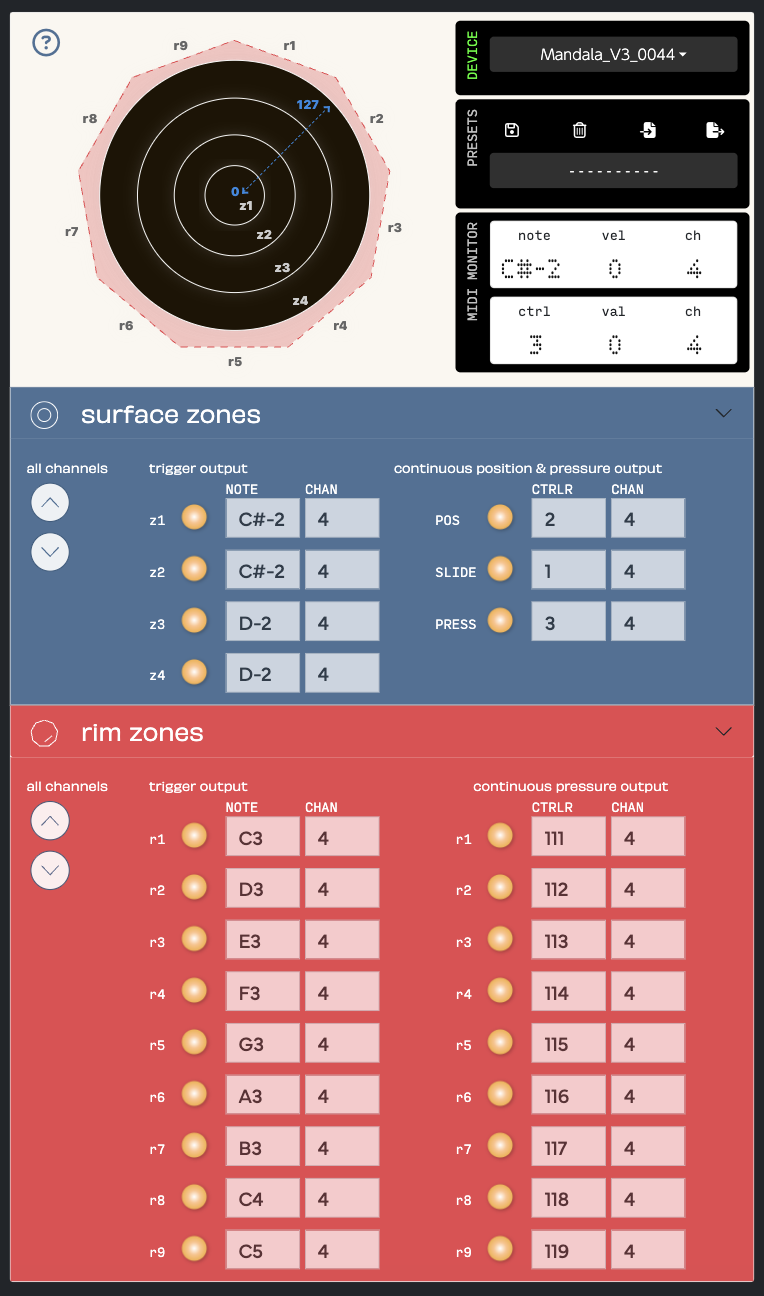
V3 Setup for Mandala #4 (used as a hat pad in conjunction with eHat pedal #4)
For the MIDI configuration of Danny’s pads, every pad is set the same except that each pad is on its own MIDI channel. You can see above that for six of the pads z1 and z2 are combined into one big zone by both being set to output the same note, C#-2.
One small difference within Danny’s setup is that Mandala #4 also has z3 and z4 combined into one big zone. So, all in all, six of Danny’s pads are set to be three zone pads and one is set to be a two zone pad. At this time Danny only uses the surface trigger zones and surface position controller and none of the rim triggers or other controllers.
Battery 4 Basics
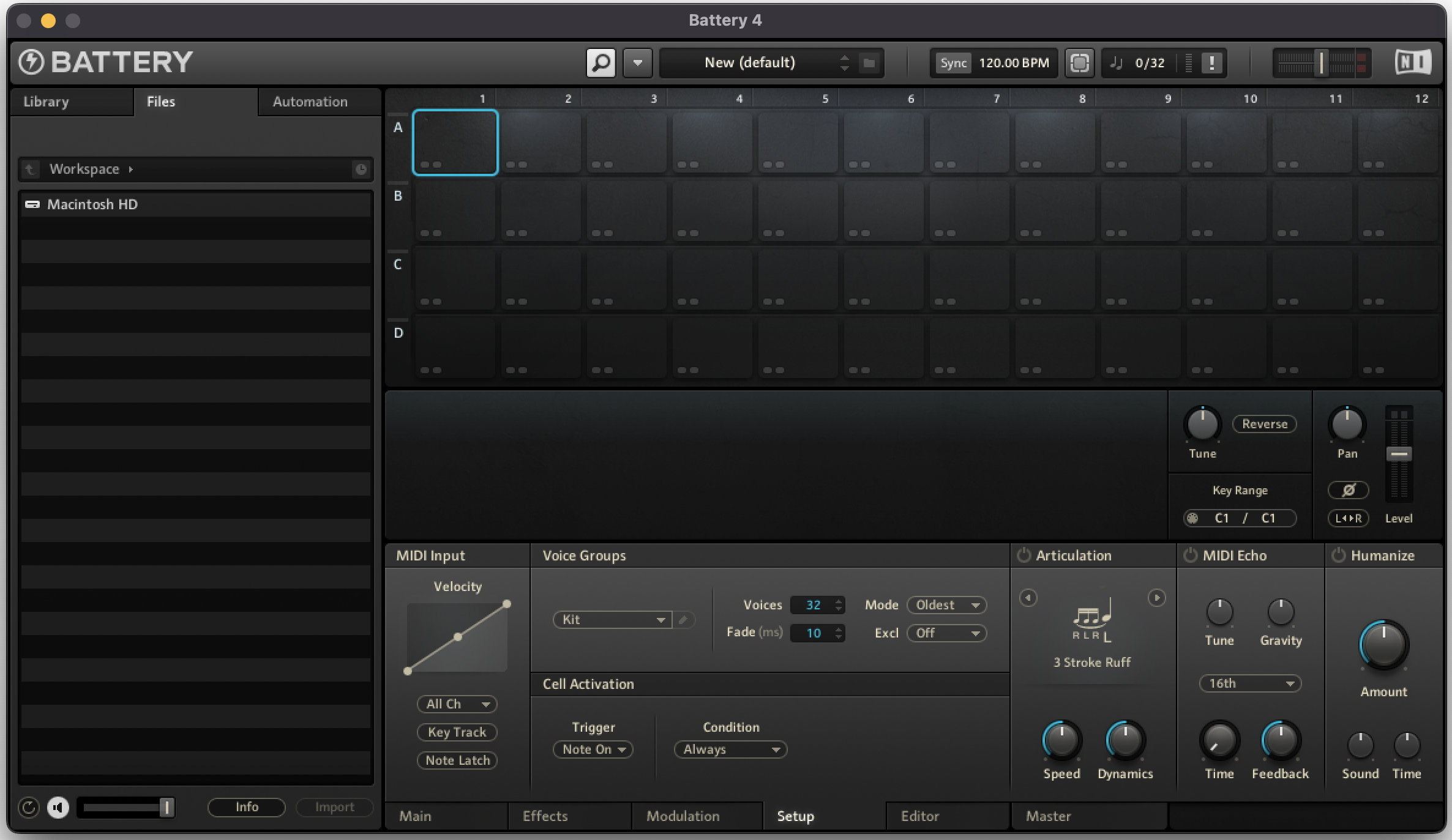
Battery 4 Blank Danny Preset
Next let’s cover the basics of Battery 4. Battery is a collection of cells in a grid pattern with columns and rows. Battery presets can have up to 16 columns (1-16) and up to 8 rows (A-H). Danny uses 12 columns and 4 rows for his presets. Each cell can have audio samples dropped into it and have associated information entered to set which MIDI notes (‘Key Range’) will trigger the cell and which MIDI channel (‘Ch.’ under MIDI Input) the cell is operating on. Above you can see the grid for one of Danny’s Battery presets before he adds any samples or setup information. Danny runs Battery 4 in standalone mode (as opposed to plugin mode within a DAW) which means under File>Audio and MIDI Settings... he’s got his Audio Driver settings configured and all of his Mandala pads turned ‘On’ as MIDI Inputs (NOT as MIDI Outputs).
Loaded and Labeled Preset (The Grudge)
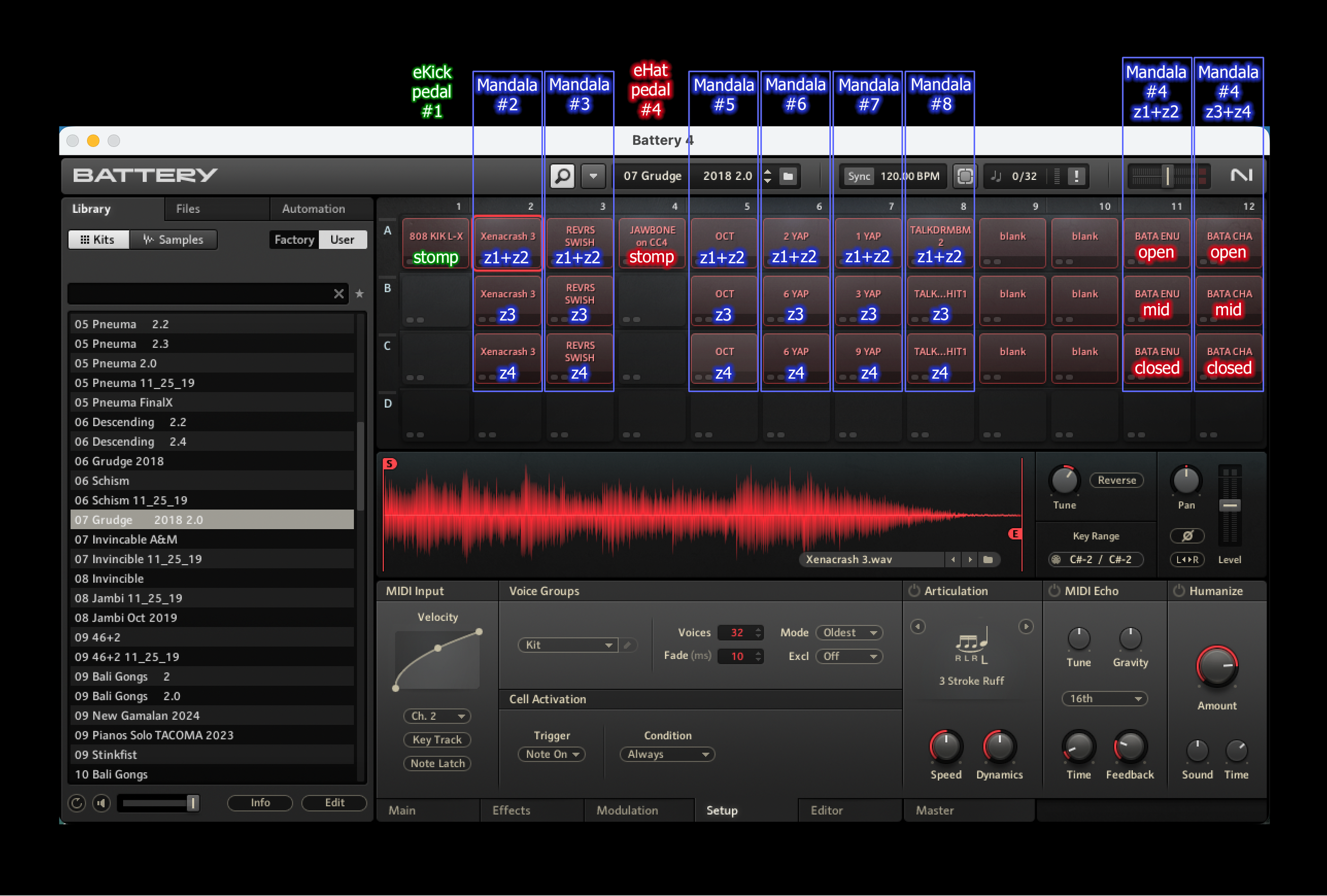
Battery 4 Preset with Explanatory Overlay for The Grudge
In Danny’s application of Battery he uses individual columns to represent his devices (#1-#8) and individual rows to represent the surface trigger zones on each Mandala (z1-z4). Above is one of his presets with cells fully populated and with added graphics to show how the columns and rows represent devices and trigger zones. This preset is for the song The Grudge.
Battery Cell Particulars for DC’s Standard Pad Config
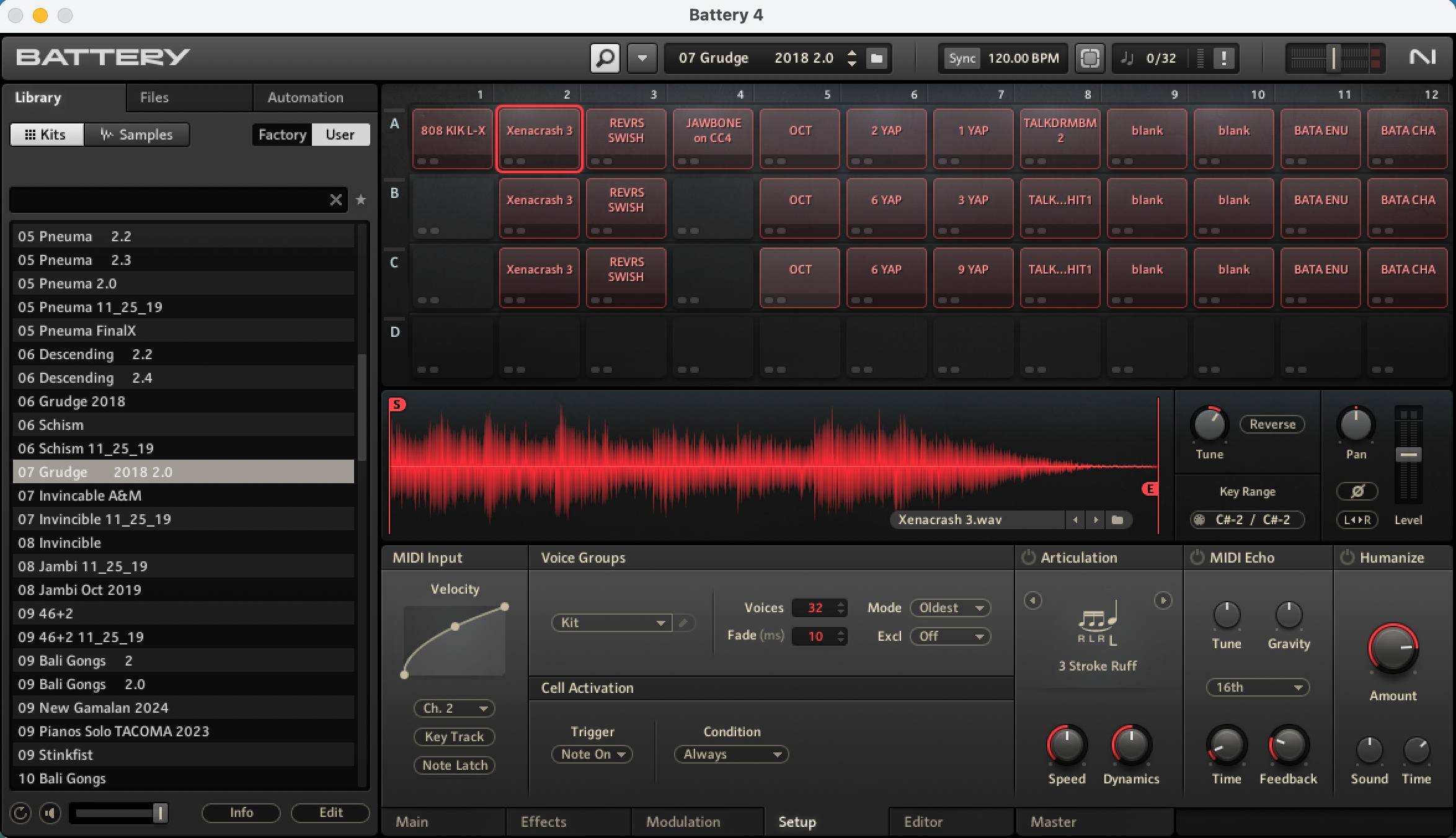
Battery 4 Preset (The Grudge) with Mandala #2 : Cell 2A Highlighted
Now that you are familiar with how Danny’s Battery presets relate to the pads and pedals in his physical kit let’s take a look at the preset for The Grudge without the explanatory graphics and with cell 2A highlighted. As you saw in the previous picture, Cell 2A represents two trigger zones (z1+z2) on device #2 (Mandala #2). Notice with cell 2A highlighted that ‘Key Range’ is set to MIDI notes C#-2/C#-2 and ‘Ch.’ is set to 2. That means that the cell is looking for MIDI note C#-2 on MIDI channel 2 to trigger it.
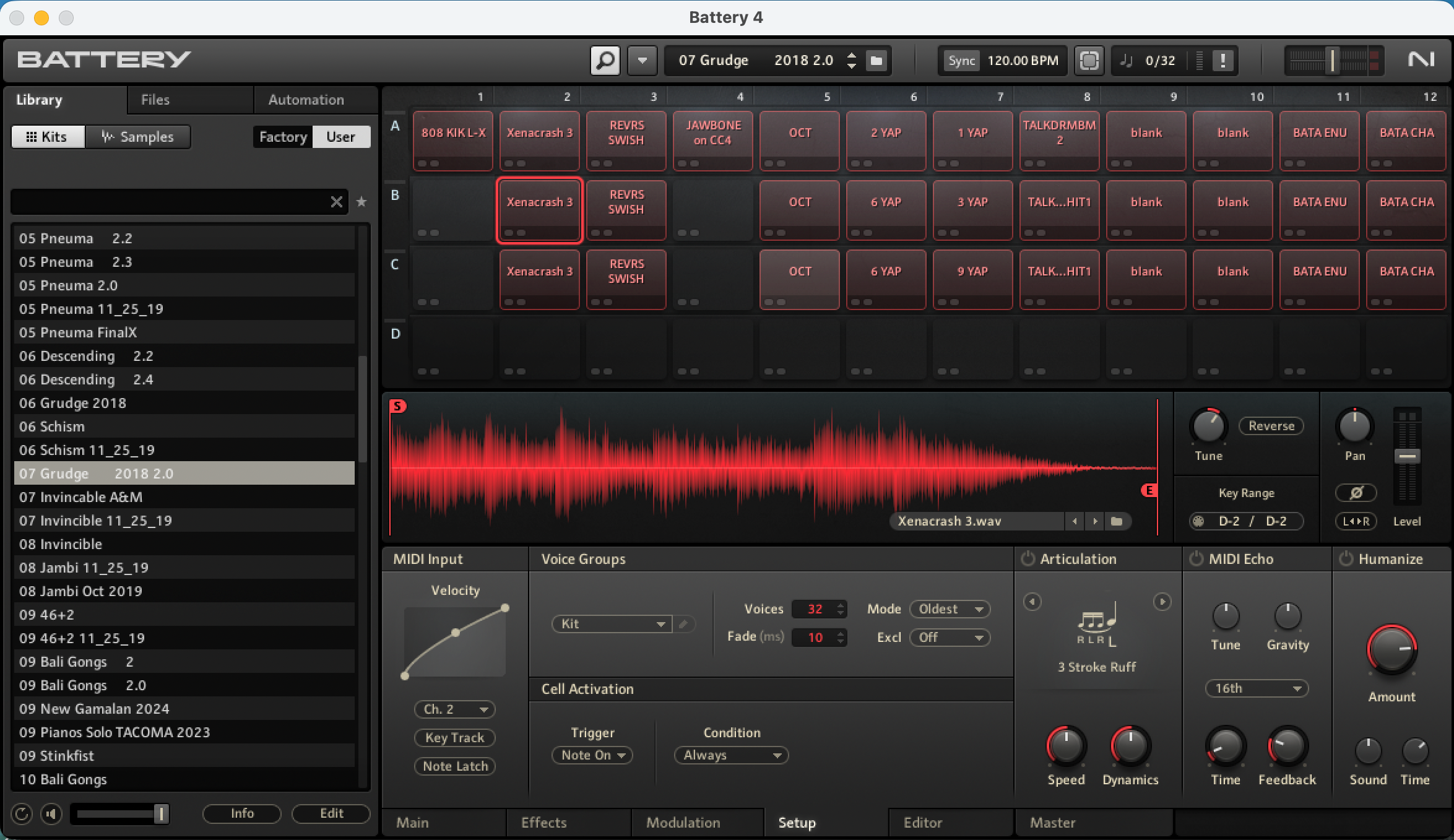
Battery 4 Preset (The Grudge) with Mandala #2 Cell 2B Highlighted
And here is the same preset with cell 2B highlighted. Cell 2B represents one trigger zone (z3) on device #2 (Mandala #2). You can see with cell 2B highlighted that ‘Key Range’ is set to MIDI notes D-2/D-2 and ‘Ch.’ is set to 2. That means that the cell is looking for MIDI note D-2 on MIDI channel 2 to trigger it.
Battery Cell Particulars for DC’s Hat Pad Config
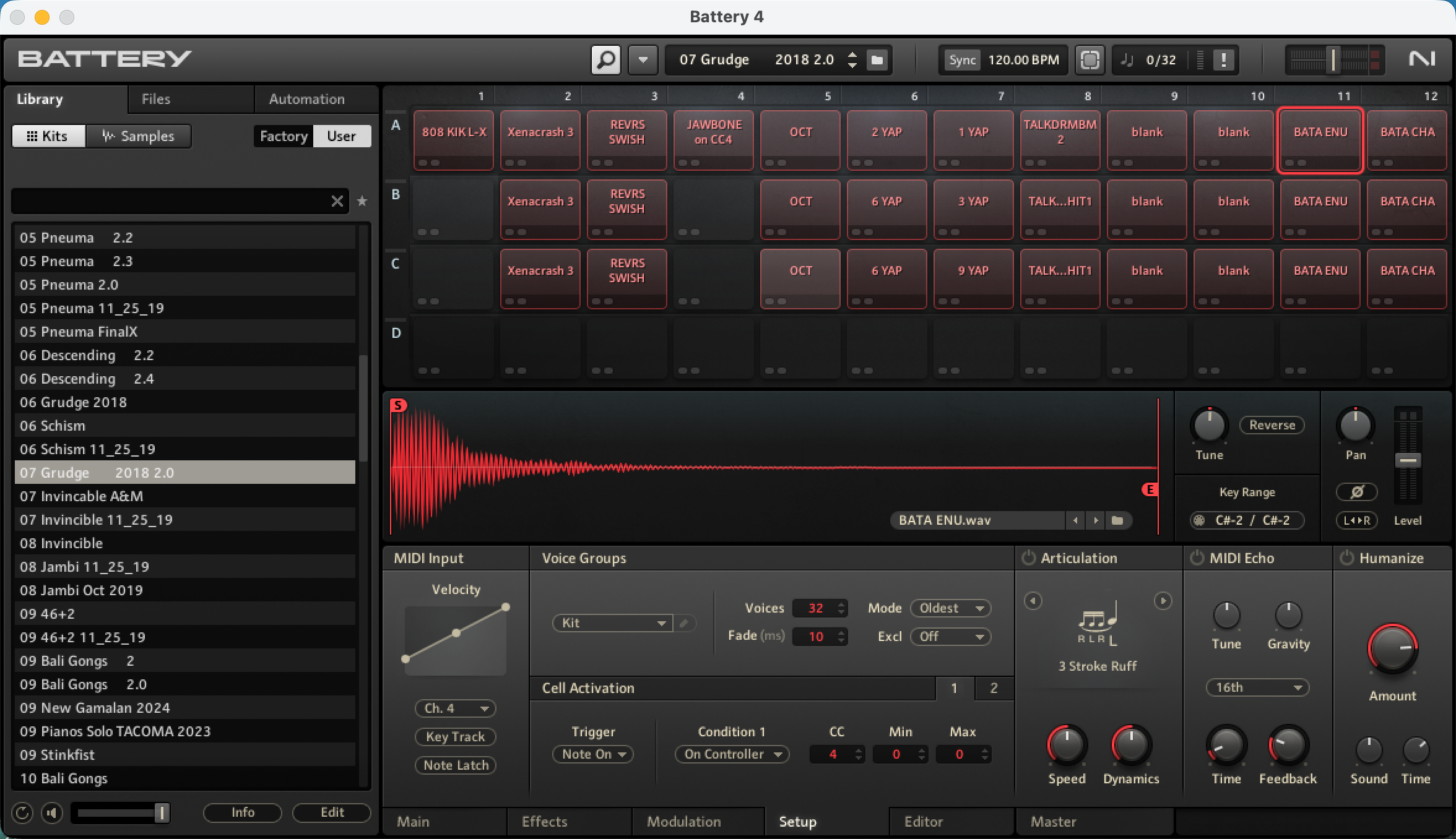
Battery 4 Preset (The Grudge) with Cell 11A (used for eHat) Highlighted
You might be wondering what columns 11 and 12 are used for. We know that stomping on the eHat pedal triggers the sample in cell 4A, but what happens instead when the eHat pedal is in the open, mid, or closed position and Danny hits z1+z2 or z3+z4 on Mandala #4? That’s what columns 11 and 12 are for. The three rows of column 11 represent which cells will trigger when Danny hits z1+z2 on Mandala #4 while the eHat pedal is either open, mid, or closed. Similarly, the three rows of column 12 represent which cells will trigger when Danny hits z3+z4 on Mandala #4 while the eHat pedal is either open, mid, or closed. This functionality is carried out using the ‘On Controller’ condition within each of those cells. Each cell will trigger upon its ‘Key Range’ note being received as long as the controller signal from the eHat currently matches the specified ‘On Controller’ range for that cell (more ‘On Controller’ info available in the Battery User Manual). You can see above with cell 11A highlighted that it will trigger when it receives note C#-2 on MIDI channel 4 as long as the eHat pedal (CC #4) is outputting a 0 (meaning the pedal is in the open position). Danny’s pedal converter box outputs 0 when the eHat is open, 127 when it is closed, and 64 at any other position.
Final Thoughts
The goal of this article is to help you know your Mandalas and know your software (in this case Battery 4) in the same way that Danny does in the implementation of his hybrid setup with Tool, and very similarly, with Beat. Basically, Mandala trigger zones send particular MIDI notes on particular MIDI channels and Battery cells look for particular MIDI notes on particular MIDI channels. When a Mandala trigger zone is engaged and those things match then you will hear audio samples play back from the associated Battery cells.
Have at it.